Monday, June 10, 2013

Understanding BGP Originator-ID and Cluster-ID

A student recently asked me a series of interesting questions about BGP route reflectors and how they use Cluster-ID. Since this is one of those topics that my students almost always seem to struggle with, let’s hope this article can clear some of the doubt.
When BGP was originally designed, there was no provision for the loop prevention inside a single autonomous system. Instead, the internal BGP rules prohibited advertising a route learned from one internal (iBGP) to another internal peer. This is the primary reason why the traditional BGP wisdom said we “must” have full mesh of iBGP peers. With the full mesh, a problem of scalability of such a setup comes into play, since the number of peering sessions will be N(N-1)/2, where N is the number of our internal BGP routers.
BGP route reflectors relax the prohibition on advertising internally learned routes to other iBGP peers, but dividing peers into two separate classes of peers: route-reflector clients and non-clients, which are regular iBGP peers with the restrictions intact. Routes learned from clients will be advertised to other clients and to non-clients. However, routes learned from non-clients will be advertised only to the clients. This situation opens up interesting loop and failure scenarios that may need special handling.

Test Network

I don’t like empty talk. It either works or it doesn’t count! To test everything I write, I need a test network. For this scenario, I will use the network shown on the diagram below.
All routers are in BGP AS 65000 and there is EIGRP configured between them. Each router has Loopback0 interface with the address 192.168.0.X, where X represents the router number. In addition to this Loopback interface, there is another, Loopback1 with the address 10.X. This additional Loopback interface is not advertised in EIGRP, but will be redistributed into BGP. Routers R4 and R5 are route-reflectors for routers R2 and R6. Initially, R2 will peer with R4, R4 will peer with R5, which will in turn peer with R2. The ultimate goal is to build a redundant peering between route-reflectors and clients without having a full mesh. All routers peer between Loopback0 interfaces.
These are the relevant interface and routing protocol configurations.
R2:
interface Loopback0
 ip address 192.168.0.2 255.255.255.255
!
interface Loopback1
 ip address 10.2.0.2 255.255.255.0
!
interface GigabitEthernet0/0
 ip address 192.168.100.2 255.255.255.0
!
router eigrp 2456
 network 192.168.0.0 0.0.255.255
 no auto-summary
!
router bgp 65000
 redistribute connected route-map CONNECTED-to-BGP
 neighbor 192.168.0.4 remote-as 65000
 neighbor 192.168.0.4 update-source Loopback0
 neighbor 192.168.0.4 send-community
!
route-map CONNECTED-to-BGP permit 10
 match interface Loopback1
 set origin igp
!
R4:
interface Loopback0
 ip address 192.168.0.4 255.255.255.255
!
interface Loopback1
 ip address 10.4.0.4 255.255.255.0
!
interface FastEthernet0/0
 ip address 192.168.100.4 255.255.255.0
!
interface FastEthernet0/1
 ip address 192.168.45.4 255.255.255.0
!
router eigrp 2456
 network 192.168.0.0 0.0.255.255
 no auto-summary
!
router bgp 65000
 redistribute connected route-map CONNECTED-to-BGP
 neighbor 192.168.0.2 remote-as 65000
 neighbor 192.168.0.2 update-source Loopback0
 neighbor 192.168.0.2 route-reflector-client
 neighbor 192.168.0.2 send-community
 neighbor 192.168.0.5 remote-as 65000
 neighbor 192.168.0.5 update-source Loopback0
 neighbor 192.168.0.5 send-community
!
route-map CONNECTED-to-BGP permit 10
 match interface Loopback1
 set origin igp
!
R5:
interface Loopback0
 ip address 192.168.0.5 255.255.255.255
!
interface Loopback1
 ip address 10.5.0.5 255.255.255.0
!
interface FastEthernet0/0
 ip address 192.168.100.5 255.255.255.0
!
interface FastEthernet0/1
 ip address 192.168.45.5 255.255.255.0
!
router eigrp 2456
 network 192.168.0.0 0.0.255.255
 no auto-summary
!
router bgp 65000
 redistribute connected route-map CONNECTED-to-BGP
 neighbor 192.168.0.4 remote-as 65000
 neighbor 192.168.0.4 update-source Loopback0
 neighbor 192.168.0.4 send-community
 neighbor 192.168.0.6 remote-as 65000
 neighbor 192.168.0.6 update-source Loopback0
 neighbor 192.168.0.6 route-reflector-client
 neighbor 192.168.0.6 send-community
!
R6:
interface Loopback0
 ip address 192.168.0.6 255.255.255.255
!
interface Loopback1
 ip address 10.6.0.6 255.255.255.0
!
interface FastEthernet0/0
 ip address 192.168.100.6 255.255.255.0
!
router bgp 65000
 redistribute connected route-map CONNECTED-to-BGP
 neighbor 192.168.0.5 remote-as 65000
 neighbor 192.168.0.5 update-source Loopback0
 neighbor 192.168.0.5 send-community
!
route-map CONNECTED-to-BGP permit 10
 match interface Loopback1
 set origin igp
!
Please note that “send-community” and “set origin igp” configurations are not required. They were configured only because I liked the idea of doing it and no other reason.
Finally, “show ip bgp summary” on R4 and R5 will show us that our configuration above worked.
R4:
R4#show ip bgp summary | begin Neighbor
Neighbor        V          AS MsgRcvd MsgSent   TblVer  InQ OutQ Up/Down  State/PfxRcd
192.168.0.2     4      65000     258     260        5    0    0 04:17:37        1
192.168.0.5     4      65000     259     259        5    0    0 04:17:19        2
R5:
R5#show ip bgp summary | begin Neighbor
Neighbor        V          AS MsgRcvd MsgSent   TblVer  InQ OutQ Up/Down  State/PfxRcd
192.168.0.4     4      65000     259     259        5    0    0 04:17:19        2
192.168.0.6     4      65000     258     260        5    0    0 04:17:25        1

Loop Prevention With Originator-ID and Cluster-ID

Loop prevention for both Cluster-ID and Originator-ID works in a very similar and simple manner:
  • If a BGP router that receives a route from an iBGP neighbor in the incoming update detects the presence of its own Router-ID in the Originator-ID attribute it will reject the update.
  • If a BGP router that receives a route from an iBGP neighbor is configured to operate as a route reflector and in the incoming update detects the presence of its own Cluster-ID in the Cluster-list attribute it will reject the update.
To illustrate this functionality and the possible loop problem, I will add a new iBGP sessions between R2 and R5, and R4 and R6 but keep them inactive to begin with.
R2:
router bgp 65000
 neighbor 192.168.0.5 remote-as 65000
 neighbor 192.168.0.5 update-source Loopback0
 neighbor 192.168.0.5 send-community
 neighbor 192.168.0.5 shutdown
!
R4:
router bgp 65000
 neighbor 192.168.0.6 remote-as 65000
 neighbor 192.168.0.6 update-source Loopback0
 neighbor 192.168.0.6 route-reflector-client
 neighbor 192.168.0.6 send-community
 neighbor 192.168.0.6 shutdown
!
R5:
router bgp 65000
 neighbor 192.168.0.2 remote-as 65000
 neighbor 192.168.0.2 update-source Loopback0
 neighbor 192.168.0.2 route-reflector-client
 neighbor 192.168.0.2 send-community
 neighbor 192.168.0.2 shutdown
!
R6:
router bgp 65000
 neighbor 192.168.0.4 remote-as 65000
 neighbor 192.168.0.4 update-source Loopback0
 neighbor 192.168.0.4 send-community
 neighbor 192.168.0.4 shutdown
!
After I have activated my new peerings, this would be the peering arrangement.
Before I activate these session, let’s examine 10.6.0.0/24 route advertised by R6 to R5 and subsequently to R4 and R2.
R5:
R5#show ip bgp 10.6.0.0/24
BGP routing table entry for 10.6.0.0/24, version 3
Paths: (1 available, best #1, table Default-IP-Routing-Table)
  Advertised to update-groups:
        1    2
  Local, (Received from a RR-client)
    192.168.0.6 (metric 156160) from 192.168.0.6 (192.168.0.6)
      Origin IGP, metric 0, localpref 100, valid, internal, best
We can see that on R5, this route looks like a “normal” iBGP-learned route. There is nothing special or unusual about it.
R4:
R4#show ip bgp 10.6.0.0/24
BGP routing table entry for 10.6.0.0/24, version 19
Paths: (1 available, best #1, table Default-IP-Routing-Table)
  Advertised to update-groups:
        2
  Local
    192.168.0.6 (metric 156160) from 192.168.0.5 (192.168.0.5)
      Origin IGP, metric 0, localpref 100, valid, internal, best
      Originator: 192.168.0.6, Cluster list: 192.168.0.5
In the above output on R4 we do have an additional line that mentions Originator and Cluster list. These two attributes are essential for loop prevention in the network that’s using route-reflectors.
We can clearly see that both R5 and R4 receive a single copy of this route. R5′s route is received from R6 and R4′s is received from R5 with the preserved attributes such as the next-hop.
Originator is the Router-ID of the iBGP peer that advertised the route to a route-reflector. In our case, this is R6. Cluster list is a set of BGP Cluster-IDs of all the route reflectors that reflected this route. By default, Cluster-ID will be the same as the Router-ID of the route reflector. Since R5′s route is not a reflected one, we’ll see only R5′s Cluster-ID on R4, but not on R5. However, if we take a look at R2, we’ll see that the Cluster-list entry is a little bit longer. We can also se that the Originator-ID has been preserved.
R2:
R2#show ip bgp 10.6.0.0/24
BGP routing table entry for 10.6.0.0/24, version 22
Paths: (1 available, best #1, table Default-IP-Routing-Table)
  Not advertised to any peer
  Local
    192.168.0.6 (metric 156160) from 192.168.0.4 (192.168.0.4)
      Origin IGP, metric 0, localpref 100, valid, internal, best
      Originator: 192.168.0.6, Cluster list: 192.168.0.4, 192.168.0.5
Let’s now activate the session between R2 and R5.
R2:
router bgp 65000
 no neighbor 192.168.0.5 shutdown
!
R4:
router bgp 65000
 no neighbor 192.168.0.6 shutdown
!
R5:
router bgp 65000
 no neighbor 192.168.0.2 shutdown
!
R6:
router bgp 65000
 no neighbor 192.168.0.4 shutdown
!
Let’s now observe the same route as before on R2 and see if there were any differences.
R2:
R2#show ip bgp 10.6.0.0/24
BGP routing table entry for 10.6.0.0/24, version 29
Paths: (2 available, best #2, table Default-IP-Routing-Table)
  Not advertised to any peer
  Local
    192.168.0.6 (metric 156160) from 192.168.0.5 (192.168.0.5)
      Origin IGP, metric 0, localpref 100, valid, internal
      Originator: 192.168.0.6, Cluster list: 192.168.0.5
  Local
    192.168.0.6 (metric 156160) from 192.168.0.4 (192.168.0.4)
      Origin IGP, metric 0, localpref 100, valid, internal, best
      Originator: 192.168.0.6, Cluster list: 192.168.0.4
R2 now has two copies of the route. One route is received from R4 and the other one from R5. The next-hop for this route is Loopback0 for which I have one EIGRP route on our shared interface. I don’t need two routes, yet I received them. It is also interesting to see what’s happening on R4 and R5.
R4:
R4#show ip bgp 10.6.0.0/24
BGP routing table entry for 10.6.0.0/24, version 20
Paths: (2 available, best #1, table Default-IP-Routing-Table)
  Advertised to update-groups:
        1    2
  Local, (Received from a RR-client)
    192.168.0.6 (metric 156160) from 192.168.0.6 (192.168.0.6)
      Origin IGP, metric 0, localpref 100, valid, internal, best
  Local
    192.168.0.6 (metric 156160) from 192.168.0.5 (192.168.0.5)
      Origin IGP, metric 0, localpref 100, valid, internal
      Originator: 192.168.0.6, Cluster list: 192.168.0.5
We can see that R4 also has two copies of this same route. One is received from R6 directly and the other one from R5. The route R4 chose as the best will be the one received directly from the neighbor, which in turn means it will be advertised to R5. Let’s confirm that.
R4:
R4#show ip bgp update-group 1
BGP version 4 update-group 1, internal, Address Family: IPv4 Unicast
  BGP Update version : 20/0, messages 0
  4 octets ASN capable
  Community attribute sent to this neighbor
  Update messages formatted 22, replicated 0
  Number of NLRIs in the update sent: max 1, min 0
  Minimum time between advertisement runs is 0 seconds
  Has 1 member (* indicates the members currently being sent updates):
   192.168.0.5
R5:
R5#show ip bgp 10.6.0.0/24
BGP routing table entry for 10.6.0.0/24, version 21
Paths: (2 available, best #2, table Default-IP-Routing-Table)
  Advertised to update-groups:
        1    2
  Local
    192.168.0.6 (metric 156160) from 192.168.0.4 (192.168.0.4)
      Origin IGP, metric 0, localpref 100, valid, internal
      Originator: 192.168.0.6, Cluster list: 192.168.0.4
  Local, (Received from a RR-client)
    192.168.0.6 (metric 156160) from 192.168.0.6 (192.168.0.6)
      Origin IGP, metric 0, localpref 100, valid, internal, best
Now, it stands to reason that after receiving this route, R5 would advertise it to its clients, which happen to include R6, the origin of our route.
R6:
R6#show ip bgp 10.6.0.0/24
BGP routing table entry for 10.6.0.0/24, version 5
Paths: (1 available, best #1, table Default-IP-Routing-Table)
  Advertised to update-groups:
        1
  Local
    0.0.0.0 from 0.0.0.0 (192.168.0.6)
      Origin IGP, metric 0, localpref 100, weight 32768, valid, sourced, best
R6 doesn’t seem to have it in its BGP table, but that doesn’t mean R5 is not advertising it. I will clear the BGP session between R5 and R6 and enable “debug ip bgp ipv4 unicast updates in” on R6.
R6:
R6#debug ip bgp ipv4 unicast updates in
BGP updates debugging is on (inbound) for address family: IPv4 Unicast

R6#clear ip bgp 192.168.0.5

 BGP: 192.168.0.5 Local router is the Originator; Discard update
 BGP(0): 192.168.0.5 rcv UPDATE w/ attr: nexthop 192.168.0.5, origin i, localpref 100, metric 0,
         originator 192.168.0.6, clusterlist 192.168.0.5 192.168.0.4, merged path , AS_PATH ,
         community , extended community , SSA attribute
 BGP(0): 192.168.0.5 rcv UPDATE about 10.6.0.0/24 -- DENIED due to: ORIGINATOR is us;
Sure enough, we can see that R5 tried to advertise the route to R6, but this update was rejected. The reason for rejection was the Originator-ID!
This explains the problem and the solution for this kind of loop, but this is not the end. At this point, R4 and R5, which are redundant route-reflectors both have copies of client routes received from clients and from each other. By itself, this is not a problem, but imagine that out clients had full Internet BGP route feeds. At the time of writing, full Internet routing table stands at around 350000 (three hundred fifty thousand, yes) routes! Advertising the routes between route-reflectors in this scenario will double the memory requirements for the BGP tables and increase the overall convergence time. This is clearly not desired.
To prevent the problem I just described, we can make our route-reflectors be members of the same redundancy cluster. To do that, we need to ensure they share the same Cluster-ID. Remember, by default, this value is derived from the Router-ID, but they are otherwise not related. I will change our Cluster-IDs to have the same value as the subnet used between our 4 routers and reset all BGP peerings.
R4 & R5:
router bgp 65000
 bgp cluster-id 192.168.100.0
!
Let’s check the status of our 10.6.0.0/24 route. We’ll start with R2.
R2:
R2#show ip bgp 10.6.0.0/24
BGP routing table entry for 10.6.0.0/24, version 4
Paths: (2 available, best #2, table Default-IP-Routing-Table)
  Not advertised to any peer
  Local
    192.168.0.6 (metric 156160) from 192.168.0.5 (192.168.0.5)
      Origin IGP, metric 0, localpref 100, valid, internal
      Originator: 192.168.0.6, Cluster list: 192.168.100.0
  Local
    192.168.0.6 (metric 156160) from 192.168.0.4 (192.168.0.4)
      Origin IGP, metric 0, localpref 100, valid, internal, best
      Originator: 192.168.0.6, Cluster list: 192.168.100.0
Just as before, we can see that we learned two routes. We should take note that Cluster-ID is now the same on both route-reflectors, which can be observed in the Cluster-list above. The situation on R4 is rather different than before though.
R4:
R4#show ip bgp 10.6.0.0/24
BGP routing table entry for 10.6.0.0/24, version 4
Paths: (1 available, best #1, table Default-IP-Routing-Table)
  Advertised to update-groups:
        1    3
  Local, (Received from a RR-client)
    192.168.0.6 (metric 156160) from 192.168.0.6 (192.168.0.6)
      Origin IGP, metric 0, localpref 100, valid, internal, best
We can see here that R4 has only one route – the one learned from R6 directly. Let’s turn on the same debug as we did earlier on R6 and see why we don’t have the route from R5 any more.
R4:
R4#debug ip bgp ipv4 unicast updates in
BGP updates debugging is on (inbound) for address family: IPv4 Unicast

R4#clear ip bgp 192.168.0.5

 BGP: 192.168.0.5 RR in same cluster. Reflected update dropped
 BGP(0): 192.168.0.5 rcv UPDATE w/ attr: nexthop 192.168.0.6, origin i, localpref 100, metric 0,
         originator 192.168.0.6, clusterlist 192.168.100.0, merged path , AS_PATH , community ,
         extended community , SSA attribute
 BGP(0): 192.168.0.5 rcv UPDATE about 10.6.0.0/24 -- DENIED due to: reflected from the same cluster;
In the debug we can very clearly observe how Cluster-ID prevented us from wasting resources. This is a primary reason why best-practices design for redundant route-reflectors calls for them to be “in the same cluster”. Is the best practice actually a good practice?

When the Best Practice Isn’t a Good Practice

Let’s for a second assume that between our clients and routers is a complex L2 network that may be susceptible to failures of all sorts (i.e. there is network between them). Let’s further assume that this underlying network experienced such a failure that prevented R2 from communicating with R5, as well as it prevented R6 to communicate with R4. In other words, we’re back to our original peering setup: R2 and R4 are peering, R4 and R5 are peering, and R5 and R6 are peering. I will simulate this “failure” by simply shutting those peerings down.
R2:
router bgp 65000
 neighbor 192.168.0.5 shutdown
!
R6:
router bgp 65000
 neighbor 192.168.0.4 shutdown
!
Let’s take a look at our 10.6.0.0/24 route on R2 now.
R2:
R2#show ip bgp 10.6.0.0/24
% Network not in table
We don’t have it! R2 is peering with R4, does that router have it?
R4:
R4#show ip bgp 10.6.0.0/24
% Network not in table
It does not. You will remember that there is no BGP session between R4 and R6. R4 won’t accept any routes from R5 that have Cluster-list populated with their shared Cluster-ID, effectively preventing R2 from learning R6′s routes. This is a problem and this problem can be solved by breaking up the cluster, essentially taking us all the way back to the beginning of this article.

Conclusions

Understanding Originator-ID and Cluster-ID is very important for understanding how iBGP works and scales. The scenario I provided in this article is a bit artificial, but only a little bit. It presents network engineers with a choice that’s not easy. Whenever designing and implementing redundant BGP route-reflectors, we may need to choose between redundancy and memory resources. Choices we make may or may not come back to haunt us.
Happy studies!
–
Marko Milivojevic – CCIE #18427
Senior CCIE Instructor – IPexpert
Join our Online Study List

BGP as-override vs allow-as-in

BGP as-override vs allow-as-in

These two functions are pretty similar, just with subtle differences. They can be used in an environment where a customer is using one AS number for many sites that are connected to an ISP. This is shown in the example below.
You can see that AS 65001 connects to the ISP at two locations. So when R2 receives the prefix 99.99.99.99/32, he will see that the AS path is via 1, 65001. Because of the loop prevention mechanism, R2 will have to reject this prefix because it can see its own AS in the AS_PATH attribute. I’ll demonstrate that now. But first, I’m going to post the full configurations because this can be pretty confusing to configure.
PE1#
ip vrf google
 rd 100:1
 route-target export 100:1
 route-target import 100:1
!
interface Loopback0
 ip address 1.1.1.1 255.255.255.255
!
interface FastEthernet0/0
 ip vrf forwarding google
 ip address 10.10.10.10 255.255.255.0
!
interface FastEthernet0/1
 ip address 15.15.15.1 255.255.255.0
 mpls ip
!
router ospf 1
 network 1.1.1.1 0.0.0.0 area 0
 network 15.15.15.0 0.0.0.255 area 0
!
router bgp 1
 no synchronization
 bgp log-neighbor-changes
 neighbor 2.2.2.2 remote-as 1
 neighbor 2.2.2.2 update-source Loopback0
 neighbor 2.2.2.2 next-hop-self
 no auto-summary
 !
 address-family vpnv4
  neighbor 2.2.2.2 activate
  neighbor 2.2.2.2 send-community extended
 exit-address-family
 !
 address-family ipv4 vrf google
  neighbor 10.10.10.11 remote-as 65001
  neighbor 10.10.10.11 activate
  no synchronization
 exit-address-family
PE2#
ip vrf google
 rd 100:1
 route-target export 100:1
 route-target import 100:1
!
interface Loopback0
 ip address 2.2.2.2 255.255.255.255
!
interface FastEthernet0/0
 ip vrf forwarding google
 ip address 20.20.20.20 255.255.255.0
!
interface FastEthernet0/1
 ip address 25.25.25.2 255.255.255.0
 mpls ip
!
router ospf 1
 network 2.2.2.2 0.0.0.0 area 0
 network 25.25.25.0 0.0.0.255 area 0
!
router bgp 1
 no synchronization
 bgp log-neighbor-changes
 neighbor 1.1.1.1 remote-as 1
 neighbor 1.1.1.1 update-source Loopback0
 neighbor 1.1.1.1 next-hop-self
 no auto-summary
 !
 address-family vpnv4
  neighbor 1.1.1.1 activate
  neighbor 1.1.1.1 send-community extended
 exit-address-family
 !
 address-family ipv4 vrf google
  neighbor 20.20.20.21 remote-as 65001
  neighbor 20.20.20.21 activate
  no synchronization
 exit-address-family
R1#
interface Loopback0
 ip address 99.99.99.99 255.255.255.255
!
interface FastEthernet0/0
 ip address 10.10.10.11 255.255.255.0
!
router bgp 65001
 no synchronization
 bgp log-neighbor-changes
 network 10.10.10.0 mask 255.255.255.0
 network 99.99.99.99 mask 255.255.255.255
 neighbor 10.10.10.10 remote-as 1
 no auto-summary
R2#
interface FastEthernet0/0
 ip address 20.20.20.21 255.255.255.0
!
router bgp 65001
 no synchronization
 bgp log-neighbor-changes
 network 20.20.20.0 mask 255.255.255.0
 neighbor 20.20.20.20 remote-as 1
 no auto-summary
P1#
interface FastEthernet0/0
 ip address 15.15.15.2 255.255.255.0
 mpls ip
!
interface FastEthernet0/1
 ip address 25.25.25.1 255.255.255.0
 mpls ip
!
router ospf 1
 network 15.15.15.0 0.0.0.255 area 0
 network 25.25.25.0 0.0.0.255 area 0
 network 35.35.35.0 0.0.0.255 area 0
So currently, on R2, he is not accepting any prefixes from R1 in the other site; as shown below (we would expect the 10.10.10.0/24 and 99.99.99.99/32 networks to be in the BGP table).
R2#sh ip bgp | b Network
   Network          Next Hop            Metric LocPrf Weight Path
*> 20.20.20.0/24    0.0.0.0                  0         32768 i
The debug below shows why he’s not accepting these prefixes.
*Mar  1 02:28:03.515: %BGP-5-ADJCHANGE: neighbor 20.20.20.20 Up
*Mar  1 02:28:03.559: BGP(0): 20.20.20.20 rcv UPDATE w/ attr: nexthop 20.20.20.20, origin i, originator 0.0.0.0, path 1 65001, community , extended community
*Mar  1 02:28:03.559: BGP(0): 20.20.20.20 rcv UPDATE about 10.10.10.0/24 -- DENIED due to: AS-PATH contains our own AS;
*Mar  1 02:28:03.559: BGP(0): 20.20.20.20 rcv UPDATE about 99.99.99.99/32 -- DENIED due to: AS-PATH contains our own AS;
One way to fix this is to use the allow-as-in command. This allows R2 to override the loop prevention mechanism by allowing an instance of AS 65001 to be in the AS_PATH. Let’s do that now.
R2(config-router)#neighbor 20.20.20.20 allowas-in 1
R2(config-router)#
*Mar  1 02:34:34.927: BGP: 20.20.20.20 sending REFRESH_REQ(5) for afi/safi: 1/1
*Mar  1 02:34:34.927: BGP: 20.20.20.20 send message type 5, length (incl. header) 23
*Mar  1 02:34:35.015: BGP(0): 20.20.20.20 rcvd UPDATE w/ attr: nexthop 20.20.20.20, origin i, path 1 65001
*Mar  1 02:34:35.015: BGP(0): 20.20.20.20 rcvd 10.10.10.0/24
*Mar  1 02:34:35.015: BGP(0): 20.20.20.20 rcvd 99.99.99.99/32
*Mar  1 02:34:35.019: BGP(0): Revise route installing 1 of 1 routes for 10.10.10.0/24 -> 20.20.20.20(main) to main IP table
*Mar  1 02:34:35.019: BGP(0): Revise route installing 1 of 1 routes for 99.99.99.99/32 -> 20.20.20.20(main) to main IP tableR2(config-router)#do sh ip bgp
BGP table version is 4, local router ID is 20.20.20.21
Status codes: s suppressed, d damped, h history, * valid, > best, i - internal,
              r RIB-failure, S Stale
Origin codes: i - IGP, e - EGP, ? - incomplete

   Network          Next Hop            Metric LocPrf Weight Path
*> 10.10.10.0/24    20.20.20.20                            0 1 65001 i
*> 20.20.20.0/24    0.0.0.0                  0         32768 i
*> 99.99.99.99/32   20.20.20.20                            0 1 65001 i
So you can see (on R2) that the AS_PATH is 1, 65001 for these prefixes. It keeps all the AS_PATH information and simply just allows 1 occurance of 65001 to be in the AS_PATH; thus overriding the loop prevention mechanism. We would obviously need to do this on R1 in order for R1 to have reachability to the 20.20.20.0/24 prefix (sitting between PE2 and R2) so that he can have a route back to R2.
R1(config)#router bgp 65001
R1(config-router)#neighbor 10.10.10.10 allowas-in 1
R2#ping 99.99.99.99

Type escape sequence to abort.
Sending 5, 100-byte ICMP Echos to 99.99.99.99, timeout is 2 seconds:
!!!!!
Success rate is 100 percent (5/5), round-trip min/avg/max = 68/83/116 ms
The other way you can complete this task is by getting PE1 & PE2 to just strip AS 65001 from the BGP UPDATE before sending it to the customer edge routers. Let’s do that now.
R1(config-router)#no neighbor 10.10.10.10 allowas-in 1
R2(config-router)#no neighbor 20.20.20.20 allowas-in 1
pe2(config)#router bgp 1
pe2(config-router)#address-family ipv4 unicast vrf google
pe2(config-router-af)#neighbor 20.20.20.21 as-overridepe1(config)#router bgp 1
pe1(config-router)#address-family ipv4 unicast vrf google
pe1(config-router-af)#neighbor 10.10.10.11 as-override
By configuring this command it actually resets the peer, so there’s no need to clear any neighbors. The result of this is shown on R2 below.
R2#sh ip bgp | b Network

   Network          Next Hop            Metric LocPrf Weight Path
*> 10.10.10.0/24    20.20.20.20                            0 1 1 i
*> 20.20.20.0/24    0.0.0.0                  0         32768 i
*> 99.99.99.99/32   20.20.20.20                            0 1 1 i
So the AS_PATH has been overridden by the PE routers to their AS number instead. This is the key difference between the two commands. Allow-as-in allowed the loop prevention to be ignored for the configured amount of instances, and the as-override caused the PE routers to modify the AS_PATH.

Thursday, June 6, 2013

Understanding BGP Regular Expressions

Regular expressions are strings of special characters that can be used to search and find character patterns. Within the scope of BGP in Cisco IOS regular expressions can be used in show commands and AS-Path access-lists to match BGP prefixes based on the information contained in their AS-Path.
In order to understand how to build regular expressions we first need to know what the character definitions are for the regex function of IOS. The below table illustrates the regex characters and their usage. This information is contained in the Cisco IOS documentation under the Appendix of Cisco IOS Terminal Services Configuration Guide, Release 12.2.
+------------------------------------------------------+
| CHAR | USAGE                                         |
+------------------------------------------------------|
|  ^   | Start of string                               |
|------|-----------------------------------------------|
|  $   | End of string                                 |
|------|-----------------------------------------------|
|  []  | Range of characters                           |
|------|-----------------------------------------------|
|  -   | Used to specify range ( i.e. [0-9] )          |
|------|-----------------------------------------------|
|  ( ) | Logical grouping                              |
|------|-----------------------------------------------|
|  .   | Any single character                          |
|------|-----------------------------------------------|
|  *   | Zero or more instances                        |
|------|-----------------------------------------------|
|  +   | One or more instance                          |
|------|-----------------------------------------------|
|  ?   | Zero or one instance                          |
|------|-----------------------------------------------|
|  _   | Comma, open or close brace, open or close     |
|      | parentheses, start or end of string, or space |
+------------------------------------------------------+
Some commonly used regular expressions include:
+-------------+---------------------------+
| Expression  | Meaning                   |
|-------------+---------------------------|
| .*          | Anything                  |
|-------------+---------------------------|
| ^$          | Locally originated routes |
|-------------+---------------------------|
| ^100_       | Learned from AS 100       |
|-------------+---------------------------|
| _100$       | Originated in AS 100      |
|-------------+---------------------------|
| _100_       | Any instance of AS 100    |
|-------------+---------------------------|
| ^[0-9]+$    | Directly connected ASes   |
+-------------+---------------------------+
Let’s break some of the above expressions down step-by-step. The first one “.*” says to match any single character (“.”), and then find zero or more instances of that single character (“*”). This means zero or more instances or any character, which effectively means anything.
The next string “^$” says to match the beginning of the string (“^”), and then immediately match the end of the string (“$”). This means that the string is null. Within the scope of BGP the only time that the AS-Path is null is when you are looking at a route within your own AS that you or one of your iBGP peers has originated. Hence this matches locally originated routes.
The next string “^100_” says to match the beginning of the string (“^”), the literal characters 100, and then a comma, an open or close brace, an open or close, a parentheses, the start or end of the string, or a space (“_”). This means that the string must start with the number 100 followed by any non-alphanumeric character. In the scope of BGP this means that routes which are learned from the AS 100 will be matched, as 100 will be the first AS in the path when AS 100 is sending us routes.
The next string “_100$” is the exact opposite of the previous one. This string says to start with any non-alphanumeric character (“_”), followed by the literal characters 100, followed by the end of the string (“$”). This means that AS 100 is the last AS in the path, or in other words that the prefix in question was originated by AS 100.
The next string “_100_” is the combination of the two previous strings with some extra matches. This string means that the literal characters 100 are set between any two non-alphanumeric characters. The first of these could be the start of the string, which would match routes learned from AS 100, while the second of these could be the end of the string, which would match routes originated in AS 100. Another case could be that the underscores represent spaces, in which the string would match any other AS path information as long as “ 100 ” is included somewhere. This would match any routes which transit AS 100, and therefore “_ASN_” is generally meant to match routes that transit a particular AS as defined by the number “ASN”.
The final string “^[0-9]+$” is a little more complicated match. Immediately we can see that the string starts (“^”), and we can see later that it ends (“$”). In the middle we see a range of numbers 0-9 in brackets, followed by the plus sign. The numbers in brackets mean that any number from zero to nine can be matched, or in other words, any number. Next we have the plus sign which means one or more instances. This string “[0-9]+” therefore means one or more instance of any number, or in other words any number including numbers with multiple characters (i.e. 1, 12, 123, 1234, 12345678, etc.). When we combine these all together this string means routes originated in any directly connected single AS, or in other words, the routes directly originated by the peers of your AS.
Now let’s look at a more complicated match, and using the above character patterns we will see how we can construct the expression step by step. Suppose we have the following topology below, where we are looking at the network from the perspective of AS 100.
+--------+ +--------+ +--------+ +--------+
| AS 200 |-| AS 201 |-| AS 202 |-| AS 203 |\
+--------+ +--------+ +--------+ +--------+ \
                                             \
           +--------+ +--------+ +--------+\  \
           | AS 300 |-| AS 301 |-| AS 302 | \  \
           +--------+ +--------+ +--------+  \  -+--------+
                                              >--| AS 100 |
                      +--------+ +--------+  /  -+--------+
                      | AS 400 |-| AS 401 | /  /
                      +--------+ +--------+/  /
                                             /
                                 +--------+ /
                                 | AS 500 |/
                                 +--------+
AS 100 peers with ASes 203, 302, 401, and 500, who each have peers as diagramed above. AS 100 wants to match routes originated from its directly connected customers (ASes 203, 302, 401, and 500) in addition to routes originated from their directly connected customers (ASes 202, 301, and 400). The easiest way to create this regular expression would be to think about what we are first trying to match, and then write out all possibilities of these matches. In our case these possibilities are:
203
203 202
302
302 301
401
401 400
500
Now we could simply create an expression with multiple lines (7 lines to be exact) that would match all of the possible AS paths, but suppose that AS 100 wants to keep this match as flexible as possible so that it will apply to any other ASes in the future. Now let’s try to generalize the above AS-Path information into a regex.
First off we know that each of the matches is going to start and going to end. This means that the first character we will have is “^” and the last character is “$”. Next we know that between the “^” and “$” there will be either one AS or two ASes. We don’t necessarily know what numbers these ASes will be, so for the time being let’s use the placeholder “X”. Based on this our new possible matches are:
^X$
^X X$
Next let’s reason out what X can represent. Since X is only one single AS, there will be no spaces, commas, parentheses, or any other special type characters. In other words, X must be a number. However, since we don’t know what the exact path is, we must take into account that X may be a number with more than one character (i.e. 10, 123, or 10101). This essentially equates to one or more instance of any number zero through nine. In regular expression syntax our two matches would therefore now read:
^[0-9]+$
^[0-9]+ [0-9]+$
This expressions reads that we either have a number consisting of one or more characters zero through nine, or a number consisting of one or more characters zero through nine followed by a space and then another number consisting of one or more characters zero through nine. This brings our expression down to two lines as opposed to our original seven, but let’s see how we can combine the above two as well. To combine them, first let us compare what is different between them.
^[0-9]+$
^[0-9]+ [0-9]+$
From looking at the expressions it is evident that the sequence “ [0-9]+” is the difference. In the first case “ [0-9]+” does not exist in the expression. In the second case “ [0-9]+” does exist in the expression. In other words, “ [0-9]+” is either true or false. True or false (0 or 1) is represented by the character “?” in regex syntax. Therefore we can reduce our expression to:
^[0-9]+ [0-9]+?$
At this point we run into a problem with the order of operations of the regex. As denoted above the question mark will apply only to the plus sign, and not to the range [0-9]. Instead, we want the question mark to apply to the string “ [0-9]+” as a whole. Therefore this string needs to be grouped together using parentheses. Parentheses are used in regular expressions as simply a logical grouping. Therefore our final expression reduces to:
^[0-9]+( [0-9]+)?$
Note that to match a question mark in IOS, the escape sequence CTRL-V or ESC-Q must be entered first, otherwise the IOS parser will interpret the question mark as an attempt to invoke the context sensitive help.

Using Extended ACLs for BGP Filtering

Prior to the support of prefix-lists in the IOS advanced filtering for BGP needed to be done using extended ACLs.  The syntax for using extended ACLs is shown below:
access-list <ACL #> permit ip <network> <wildcard mask of network> <subnet mask> <wildcard mask of subnet mask>
The source portion of the extended ACL is used to match the network portion of the BGP route and the destination portion of the ACL is used to match the subnet mask of the BGP route.  Here are some examples:
access-list 100 permit ip 10.0.0.0 0.0.0.0 255.255.0.0 0.0.0.0
Matches 10.0.0.0/16 – Only
access-list 100 permit ip 10.0.0.0 0.0.0.0 255.255.255.0 0.0.0.0
Matches 10.0.0.0/24 – Only
access-list 100 permit ip 10.1.1.0 0.0.0.0 255.255.255.0 0.0.0.0
Matches 10.1.1.0/24 – Only
access-list 100 permit ip 10.0.0.0 0.0.255.0 255.255.255.0 0.0.0.0
Matches 10.0.X.0/24 – Any number in the 3rd octet of the network with a /24 subnet mask.
access-list 100 permit ip 10.0.0.0 0.255.255.0 255.255.255.0 0.0.0.0
Matches 10.X.X.0/24 – Any number in the 2nd & 3rd octet of the network with a /24 subnet mask.
access-list 100 permit ip 10.0.0.0 0.255.255.255 255.255.255.240 0.0.0.0
Matches 10.X.X.X/28 – Any number in the 2nd, 3rd & 4th octet of the network with a /28 subnet mask.
access-list 100 permit ip 10.0.0.0 0.255.255.255 255.255.255.0 0.0.0.255
Matches 10.X.X.X/24 to 10.X.X.X/32 – Any number in the 2nd, 3rd & 4th octet of the network with a /24 to /32 subnet mask.
access-list 100 permit ip 10.0.0.0 0.255.255.255 255.255.255.128 0.0.0.127
Matches 10.X.X.X/25 to 10.X.X.X/32 – Any number in the 2nd, 3rd & 4th octet of the network with a /25 to /32 subnet mask

Wednesday, June 5, 2013

BGP Multipath-Relax

So I learned a new command today. As usual I want to share with everyone. Today’s command is “bgp bestpath as-path multipath-relax”, which is actually hidden in IOS.
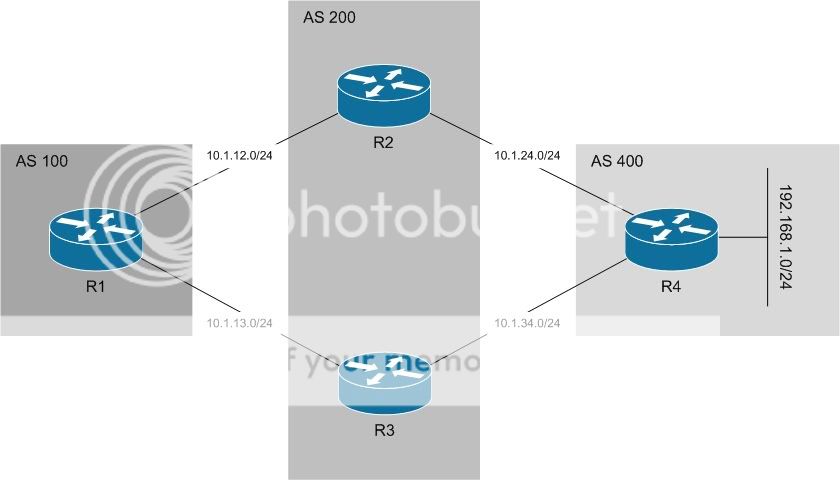
To give some background, BGP will not load balance across multiple paths by default. We can configure it to do so with the “maximum-paths n” command, which is pretty well known. The criteria of this command is that all attributes must match (Weight, LP, AS Path, etc). This is acceptable if we are multihomed to a single AS, but what if we are multihomed to different ASes? In that case we are not able to load balance across theoretically equal paths. Enter the “bgp bestpath as-path multipath-relax” command…
Here’s our first topology:

(click for fullsize)
Now the config:
R1(config)#router bgp 100
R1(config-router)#no synchronization
R1(config-router)#neighbor 10.1.12.2 remote-as 200
R1(config-router)#neighbor 10.1.13.3 remote-as 200
R1(config-router)#no auto-summary
Here we see the basic BGP config on R1. We will only be configuring R1 in this post.
Let’s look at the BGP table and RIB.
R1#sh ip bgp
...
   Network          Next Hop            Metric LocPrf Weight Path
*  192.168.1.0      10.1.12.2                              0 200 400 i
*>                  10.1.13.3                              0 200 400 i
 
 
R1#sh ip route
...
     10.0.0.0/24 is subnetted, 2 subnets
C       10.1.13.0 is directly connected, Serial0/1
C       10.1.12.0 is directly connected, Serial0/0
B    192.168.1.0/24 [20/0] via 10.1.13.3, 00:01:16
We see that BGP has selected the path through R3 and put the router in its RIB.
Now we will configure BGP to use two paths, then we’ll verify:
R1(config)#router bgp 100
R1(config-router)#maximum-paths 2
 
R1#sh ip route
...
     10.0.0.0/24 is subnetted, 2 subnets
C       10.1.13.0 is directly connected, Serial0/1
C       10.1.12.0 is directly connected, Serial0/0
B    192.168.1.0/24 [20/0] via 10.1.13.3, 00:03:18
                    [20/0] via 10.1.12.2, 00:00:15
Simple command under the BGP process, we see that R1 is now equally load balancing across both paths.
Now we will change it up a bit.
Here’s our second topology:

(click for fullsize)
This time R2 and R3 are in separate ASes. Let’s try “maximum-paths” again and see what happens:
R1(config)#router bgp 100
R1(config-router)# maximum-paths 2
 
R1#sh ip bgp
...
   Network          Next Hop            Metric LocPrf Weight Path
*  192.168.1.0      10.1.13.3                              0 300 400 i
*>                  10.1.12.2                              0 200 400 i
 
R1#sh ip route
...
     10.0.0.0/24 is subnetted, 2 subnets
C       10.1.13.0 is directly connected, Serial0/1
C       10.1.12.0 is directly connected, Serial0/0
B    192.168.1.0/24 [20/0] via 10.1.12.2, 00:00:04
As expected we see that R1 is not load balancing because it does no see the paths as “equal” (different AS Paths).
This is where “bgp bestpath as-path multipath-relax” comes in:
R1(config)#router bgp 100
R1(config-router)#bgp bestpath as-path ?
% Unrecognized command
R1(config-router)#bgp bestpath as-path multipath-relax
R1(config-router)#
 
R1#sh run | sec bgp
router bgp 100
 bgp bestpath as-path multipath-relax
 neighbor 10.1.12.2 remote-as 200
 neighbor 10.1.13.3 remote-as 300
 maximum-paths 2
 
R1#sh ip route
...
     10.0.0.0/24 is subnetted, 2 subnets
C       10.1.13.0 is directly connected, Serial0/1
C       10.1.12.0 is directly connected, Serial0/0
B    192.168.1.0/24 [20/0] via 10.1.13.3, 00:00:16
                    [20/0] via 10.1.12.2, 00:00:16
And it works! Notice that the command doesn’t show up when we use the “?”. It is a hidden command. I’m not sure why at this point, just that it is. We do see it when we look at R1′s BGP config though.
That’s it for this one, just a short post on something new I learned today.
Related Posts Plugin for WordPress, Blogger...